Global Dynamic Residential FAQ
What Is a Global Dynamic Residential IP?
| Product Name | Advantages | Suitable Business Types |
|---|---|---|
| 🏘️Global Dynamic Residential | 🌟Wide geographic distribution 🌟Residential household IP attributes 🌟Up to 95 million IPs 🌟API quick integration support 🌟Short IP online time (1–30 minutes) 🌟Billed by traffic (access all dynamic residential IP pool IPs) | ✅High concurrency ✅Use-and-discard IPs ✅Need a large number of IPs ✅Low traffic consumption per IP ✅No strict requirements for IP online duration (1–30 minutes) Suitable businesses: Big Data Collection Market Research SEO Optimization Competitor AnalysisMore use cases waiting for you to explore! |
What Is a Sub-Account? How to Understand Sub-Accounts?
You can think of 1 sub-account as 1 independent device or 1 independent IP.
If you have 100 devices that need to use proxy IPs, you generate 100 sub-accounts, with each device using 1 sub-account.
| Device No. | Sub-Account (view in sub-account list) |
|---|---|
| 1 | Sub-account-1 |
| 2 | Sub-account-2 |
| 3 | Sub-account-3 |
| 4 | Sub-account-4 |
| 5 | Sub-account-5 |
| 6 | Sub-account-6 |
| ... | ... |
| 5000 | Sub-account-5000 |
By controlling sub-account parameters such as country, region, and online duration, you can achieve precise IP control for each device.
Relationship Between Acceleration Tunnels and Sub-Accounts
The main function of an acceleration tunnel is to improve the network experience when you use proxy IPs (your sub-accounts), helping you increase business efficiency.
How to Switch IPs?
Switching method:
Go to [Purchased Orders] > [Global Dynamic Residential]
Find the
Switch IPbutton in theActionscolumn of theSub-Account List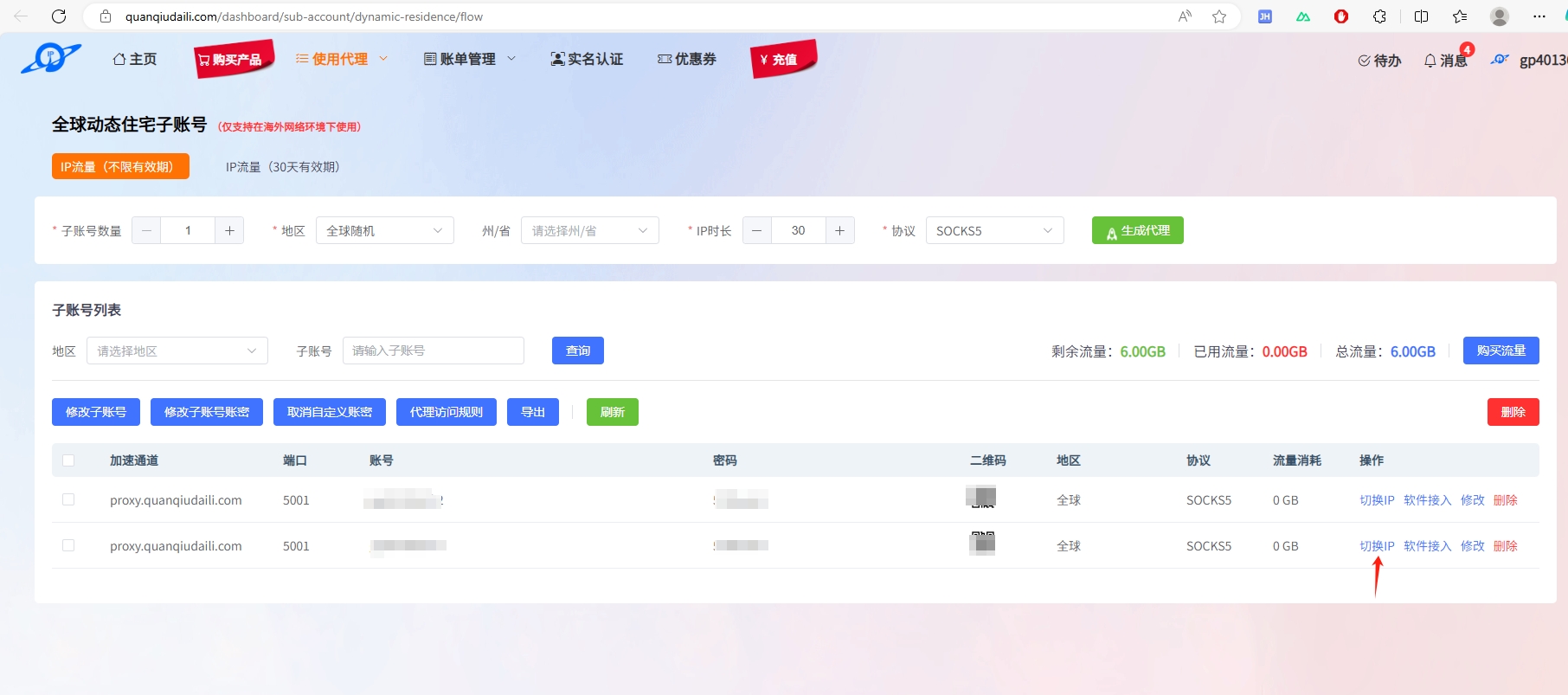
In the popup, click
Switch Now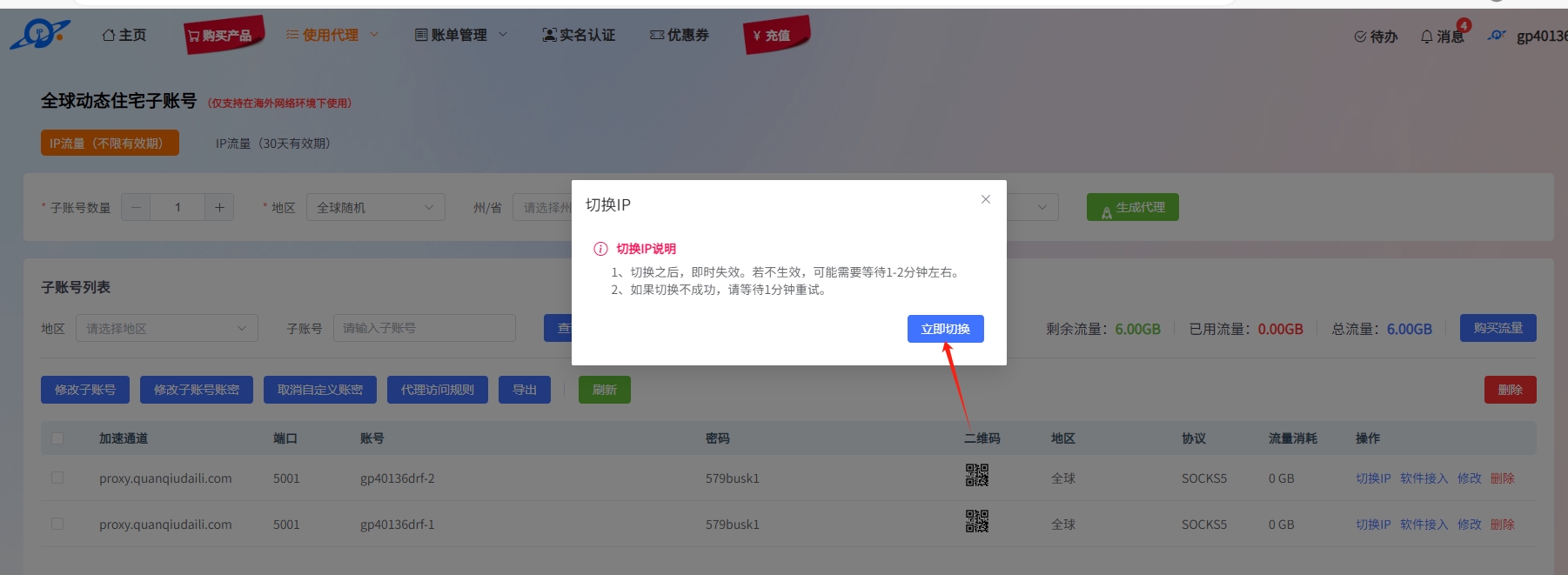
What Is IP Duration?
- Configurable IP duration for Global Dynamic Residential: 1–30 minutes
- Since Global Dynamic Residential IPs come from household residences, we cannot guarantee 100% that every proxy IP will remain online for the exact duration you set
Enter the number of minutes you want the Global Residential proxy IP to automatically rotate.
What Is the Bandwidth Speed for Global Dynamic Residential?
Default is 1–2 Mbps, but actual speeds can exceed 2 Mbps.
What Is Deduplication?
After enabling Deduplication, you will not receive duplicate IPs within 24 hours. If your business is not sensitive to IP quality, we do not recommend enabling deduplication, as it will increase the IP switching time.
Why Is Deduplication Needed?
Some businesses have very high requirements for proxy IP quality and do not want to use the same IP within 24 hours — in this case, you can enable deduplication.
How Is Traffic Calculated?
Traffic is calculated as the total of upload + download across all sub-accounts.
Uses a base-1000 system, not base-1024.
Why Is My Traffic Being Consumed So Quickly?
When using proxy IPs, accessing too many images and videos consumes a lot of traffic.
We recommend analyzing your traffic with a packet capture tool based on your business needs, and using Proxy Access Rules to block or bypass unnecessary multimedia files (images, videos, and other media files).
What Are Proxy Access Rules?
Proxy Access Rules is a feature developed by Global Proxies to help customers save costs.
Domains in the Proxy Access Rules Blocked Access Blacklist will be inaccessible when you visit them through Global Dynamic Residential proxy IPs.
Domains in the Proxy Access Rules Bypass Access List will have their traffic covered by Global Proxies when accessed through Global Dynamic Residential proxy IPs — the traffic will not count toward your usage.
How to Set Up Proxy Access Rules?
- If you are not familiar with packet capture analysis, please use this feature with caution
- Since different customers have completely different businesses, Global Proxies does not provide any packet capture analysis support
Go to [Purchased Orders] > [Global Dynamic Residential] and find Proxy Access Rules in the Global Dynamic Residential Sub-Account List.
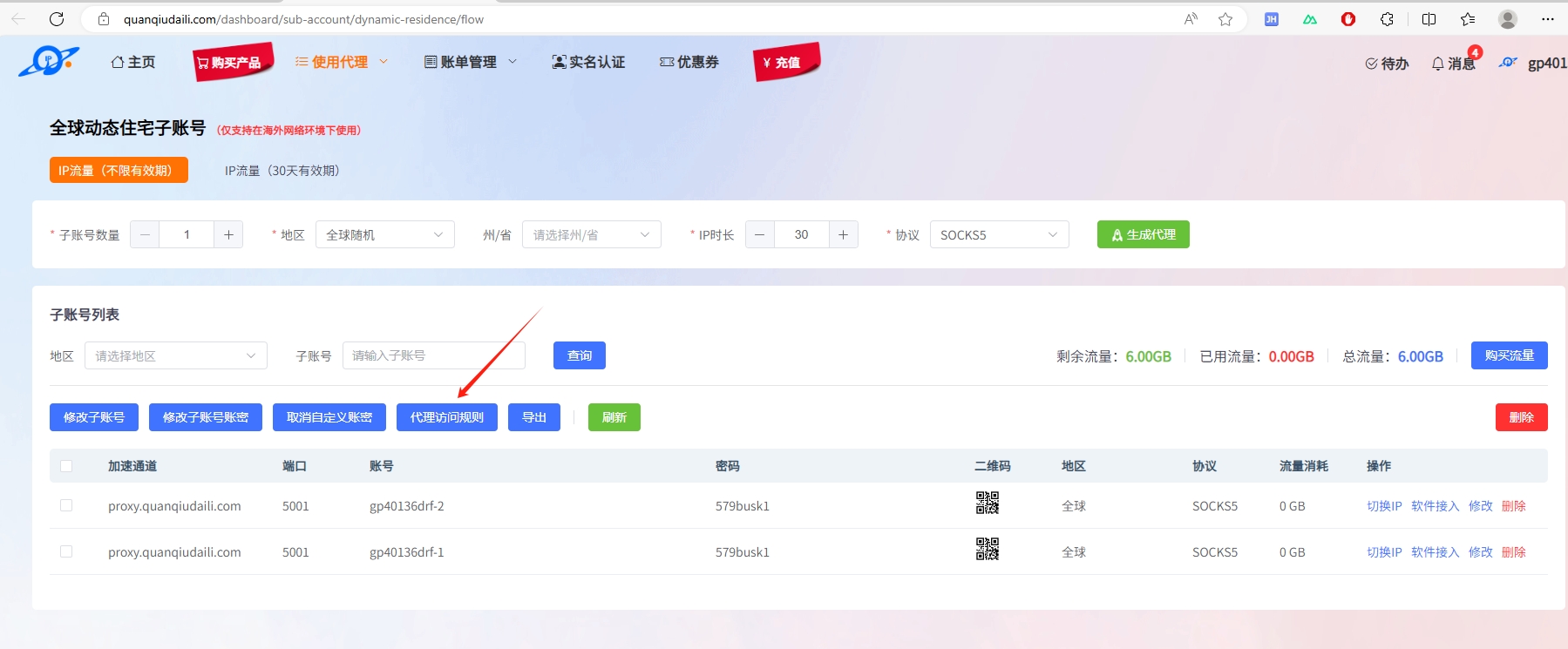
After packet capture analysis, add the domains you want to block or bypass, and the changes will take effect in 10 minutes.
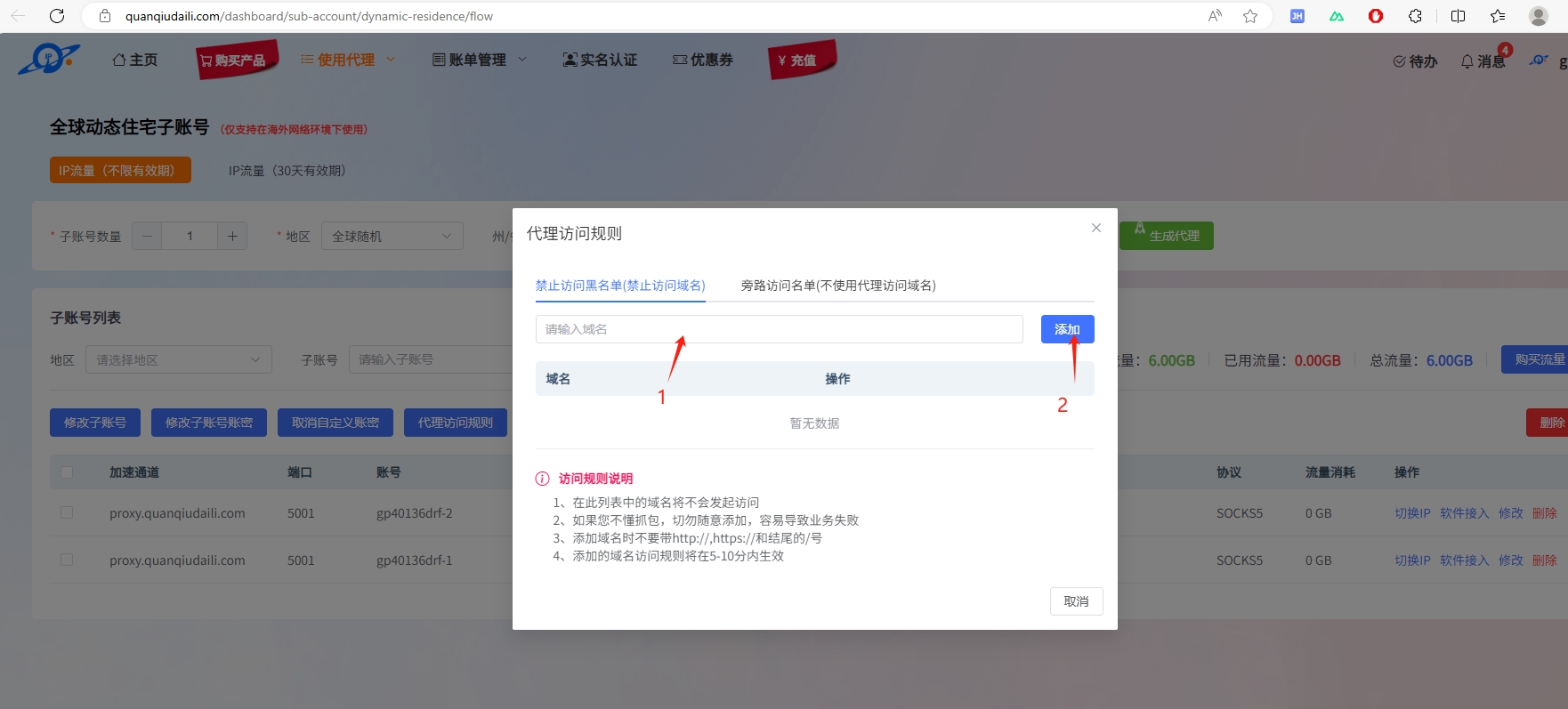
What Is a Traffic Package?
To use Global Dynamic Residential proxy IPs, you need to first purchase a Global Dynamic Residential traffic package.
Your traffic usage will be deducted from the traffic package. When the remaining traffic reaches 0, the service will become unavailable.
What Do the Parameters in the Logs Mean?
Traffic calculation: upload + download = total traffic consumed
Traffic deduction interval: every 5 minutes
| Parameter | Description |
|---|---|
| prot | Access port |
| write | Upload traffic |
| read | Download traffic |
| account | Sub-account ID |
| host | Accessed domain |
| time | Timestamp of the event |


