Translate your site
Let's translate docs/intro.md to French.
Configure i18n
Modify docusaurus.config.js to add support for the fr locale:
docusaurus.config.js
module.exports = {
  i18n: {
    defaultLocale: 'en',
    locales: ['en', 'fr'],
  },
};
Translate a doc
Copy the docs/intro.md file to the i18n/fr folder:
mkdir -p i18n/fr/docusaurus-plugin-content-docs/current/

cp docs/intro.md i18n/fr/docusaurus-plugin-content-docs/current/intro.md
Translate i18n/fr/docusaurus-plugin-content-docs/current/intro.md in French.
Start your localized site
Start your site on the French locale:
npm run start -- --locale fr
Your localized site is accessible at http://localhost:3000/fr/ and the Getting Started page is translated.
caution
In development, you can only use one locale at a same time.
Add a Locale Dropdown
To navigate seamlessly across languages, add a locale dropdown.
Modify the docusaurus.config.js file:
docusaurus.config.js
module.exports = {
  themeConfig: {
    navbar: {
      items: [
        {
          type: 'localeDropdown',
        },
      ],
    },
  },
};
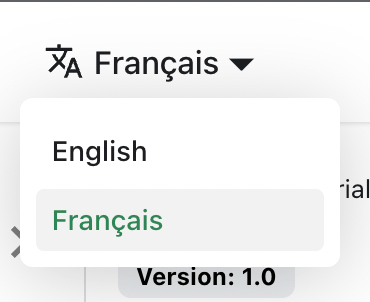
The locale dropdown now appears in your navbar:
Build your localized site
Build your site for a specific locale:
npm run build -- --locale fr
Or build your site to include all the locales at once:
npm run build


